

Native mobile app development vs cross-platform app development
One of the hottest topics fueling numerous discussions is native vs cross-platform app development. They break into camps of those who are for native mobile app development, arguing for its performance. Those who argue for cross-platform emphasize the app’s exposure. If you go cross-platform, you get a richer number of potential users. Of course, this is just the tip of the iceberg.
Having a great idea for a mobile app, there are no hard-and-fast rules for saying that educational apps should be cross-platform, or gaming apps should be native. The same goes for other major app categories: service, banking, fitness, productivity, etc. Which development path to take depends on a range of factors such as:
- business idea and strategy,
- budget and time constraints,
- app functionality,
- market preferences.
In this blog, we’ll discuss business considerations over native vs cross-platform app development.
If you have a business idea for a web app, then consider Custom Web App Development.
Table of contents

Native Mobile App Development
Today’s two major platforms for mobile apps are Apple’s App Store and Google Play for Android devices.
Native mobile app development means developing an app that uses a native programming language for the platform it is going to operate on. So, Custom iOS App Development will utilize language and tools native to the iOS operating system. Prior to 2014, the language for the iOS platform was Objective-C. Since 2014, the language is Swift. Swift is Apple’s novelty specifically designed to run faster. In fact, apps written in Swift can run up to 2.6 times faster than those written in Objective-C. And Apple users do love performance.
Custom Android App Development is alike. It is written in a language native to the Android platform. Same story here: prior to 2016 – it was written in Java, since 2016 – it has been written in Kotlin. However, the reason for switching languages was not performance. Kotlin ensures cleaner and more concise code, fewer errors, greater robustness, and easier maintainability. In terms of performance, Kotlin is similar to Java. But virtually everyone would confirm that Kotlin is the only practical choice for Android native mobile app development.

Cross-platform App Development
If you wish to shoot for both the App Store and Google Play with one app, you can choose cross-platform development.
There are several frameworks available: React Native, Flutter, and Xamarin/MAUI. They are mostly utilized for cross-platform mobile development. Yet, some offer support for desktop apps and web apps. React Native offers support for Android and iOS as well as for Android TV, macOS, tvOS, Web, Windows/UWP, and VR. Flutter also allows you to maintain a single codebase for such platforms as Android and iOS; plus, additionally web, Fuchsia, Linux, macOS, and Windows. MAUI is now replacing Xamarin and May 2024 is when Xamarin technology will no longer be maintained. .NET MAUI instead offers a new and powerful toolkit for cross-platform mobile and desktop apps. There are also others: Ionic, Flutter, NativeScript, and more.
How to Choose between Native VS Cross-Platform App Development?
Profitability
In native mobile app development, iOS mobile apps generate more revenue. Thus, they have higher profitability than Android apps. 2 times more profitability for Custom iOS App Development on average. When you choose between Android or iOS app development – you choose different markets as a business owner. Android indeed has higher numbers of users, but consider the demographics. Android dominates regions such as South America, Asia and Africa. iOS dominates in the USA, Canada, Japan, and more. So, generally, you can see that qualitatively the iOS market targets users with higher purchasing power. Moreover, Apple devices generally cost more than Android ones. This factor on its own is an indicator of users with access to financing and willingness to spend.
In Q3 of 2022, Apple’s app store generated $21.2 billion in revenues worldwide, while Google Play generated $10.4 billion worldwide.
Statista
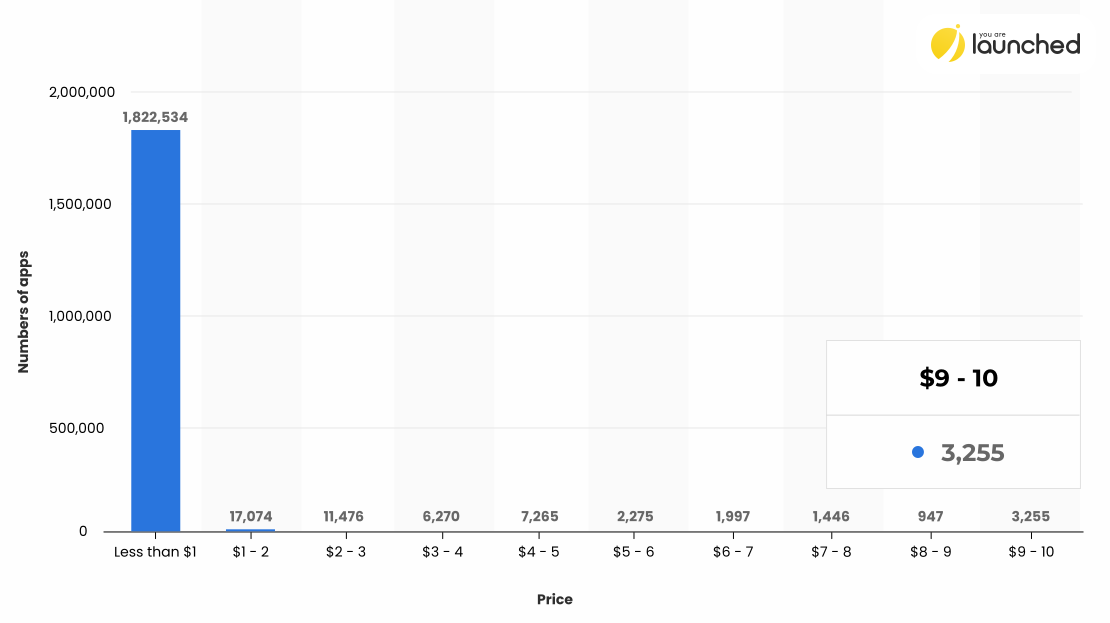
The chart above shows the data for Apple apps. It indicates that most apps cost less than a dollar. This category also includes freemium and free apps.
Now, the chart below shows the percentage of free versus paid apps for Android.
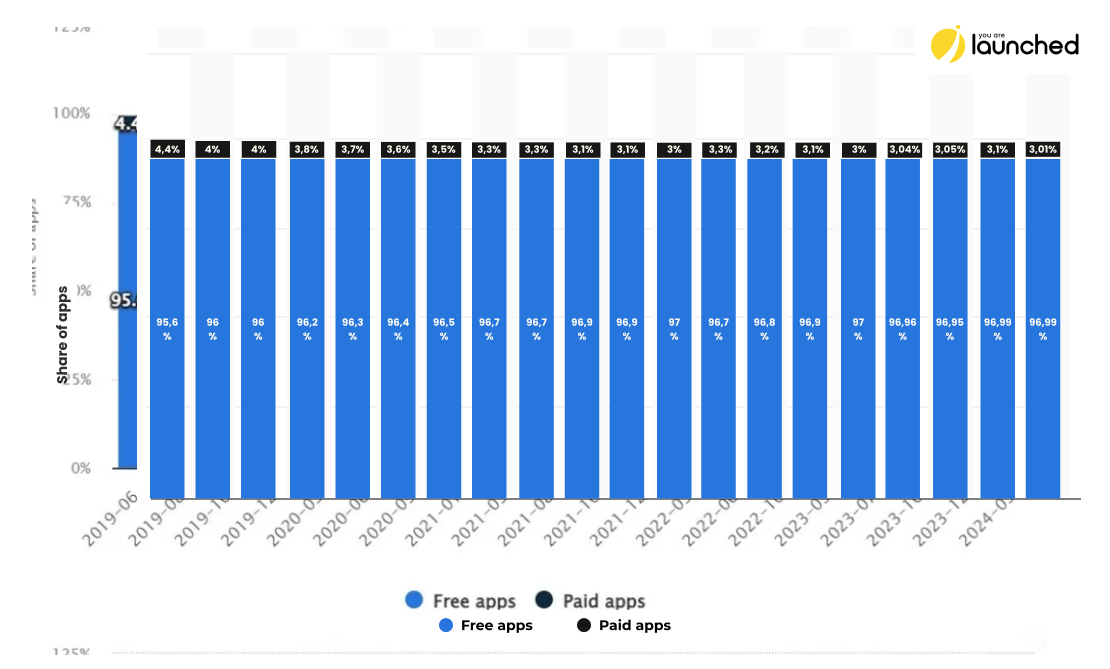
A note of the app category must be included whichever native mobile app development you choose. The charts above include overall observations. However, variance is found when the app category is factored in. So, if you decide between Android or Apple custom app development, it is better to research the app category. For instance:
- How many apps are in your chosen category on each platform?
- How much do they charge and what monetization strategy follow?
- Checking the reviews might provide a grasp of demographics;
- Third-party intelligence might provide more data on top apps’ demographics in your category.
You can check out more on app types in the article A Thorough Guide to Different Types of Mobile Applications.
Business Idea and Strategy
In terms of your business idea, consider region and target demographics for your chosen app category. Imagine you are developing a vocabulary-learning app or whatnot. How are you going to promote it?
- Would you choose to have a free tier in your app with basic features and then offer an upgrade to paid ones?
- Or do you consider a free app which then will direct users to a paid app?
- Maybe you have a marketing strategy that users will be ready to pay for plans from the start after a short trial?
The general observation is that in the App Store (iOS), the free model is less effective than paid or freemium models.
On the Android platform, paid and free models are likely to bring more revenue than a freemium model.
****
What about cross-platform app development? App marketplaces are highly competitive and fast-paced. If you go cross-platform, you compete simultaneously in both markets. Make sure you have dedicated people to manage each one separately. Once you launch, new apps have an advantage. It lasts on average 30 days. Just make sure you have market experts for both platforms to swiftly react and adjust things.
Cost and Time
Cross-platform will be the most cost-efficient. After all, you have one team developing one app for all platforms. It will surely be cheaper than to have one team for the Android app and the other one for an iOS app.
However, if you compare between one Android app and one cross-platform app, then Android is cheaper. And Custom Android App Development is faster. With cross-platform development, you still need developers’ cross-platform skills. They need to account for the requirements of both platforms. Factor in that now cross-platform technology is rapidly evolving. It means developers need to keep up-to-date. Plus, updates and maintenance.
iOS app will likely be somewhat at the same level as a cross-platform app. But only in terms of cost. In terms of time, the iOS app would be faster to develop. iOS developers are paid a little higher than Android developers. They also use more expensive equipment: MacBooks instead of more affordable options. Plus, the iOS app store is a little more frequent with new rules. Moreover, it is more demanding with upholding the standards. So, iOS development will turn out to be somewhat more expensive than Android development.
Functionality
Native apps have access to phone native features. It means broader capabilities as well as faster performance for native mobile app development. These days, almost all native features can be accessed through some sort of API for cross-platform development. However, their performance will likely be slowed and with errors. For instance, NFC or Bluetooth is the phone’s hardware, and it can be accessed often only by third-party libraries for cross-platform apps. To access ARCore on Android and ARKit on iOS, cross-platform apps will also require third-party plugins.
UI/UX
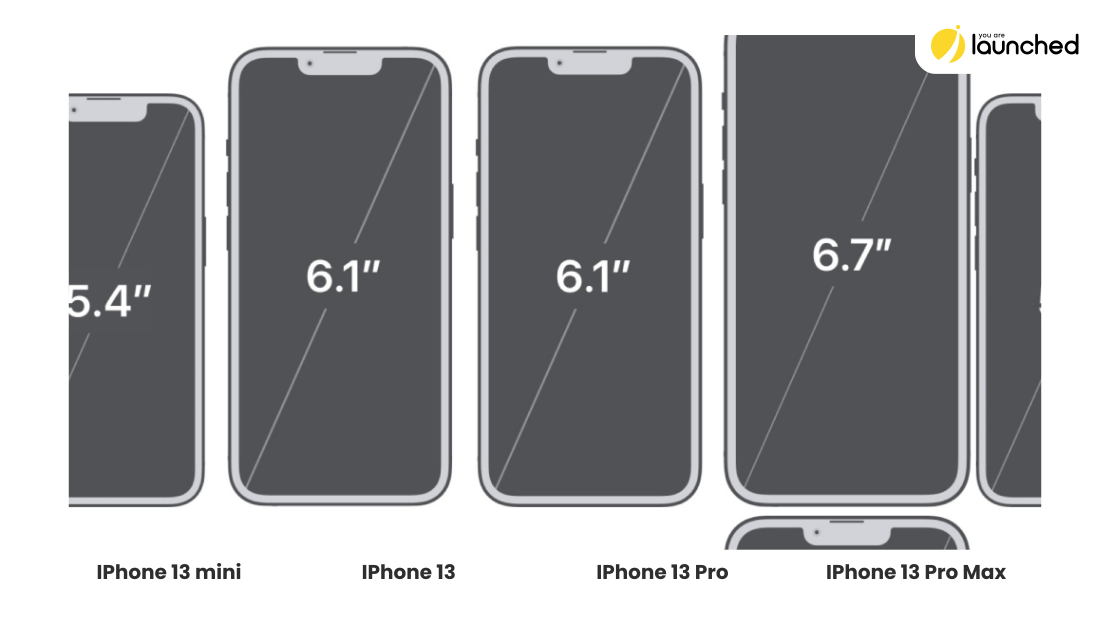
The main issue though is UI/UX. The biggest success factor of mobile apps is their appealing looks on small phone screens. Cross-platform apps sometimes experience rendering issues. Fragmentation comes from an immense number of devices, each device runs a different version of the operating system. Lastly, each manufacturer develops their own screen technologies for user experience. This all creates variability which is hard to cater to. In contrast, iOS development is the most standardized. You could probably guess this from the looks of iPhones. 6.1 inch diagonal with rounded corners. With some variations. But imagine how varied are Android devices. Samsung, Xiaomi, Google Pixel, Motorola, etc.
In contrast, the point in favor of cross-platform app development forward is consistency. When there are two separate versions, Android and iOS, exist: there are often issues even in functionality, not UI/UX only. The iOS team can release one feature, and the Android team another. A/B testing can be done differently. Certain screens would look differently. After a while, these apps take different development routes. For apps that are in business for the long term, these create difficulties. However, it is not a consideration for MVP development.
In-Built Native Features
Here are some performance metrics below for two simple phone functions: accelerometer and contacts. They are for cross-platform apps measured against a native one. Accelerometer is used in activity-tracking apps. In addition, the accelerometer detects screen orientation and other types of movement. Contacts simply means the app’s access to the contact list. The first line is for native development and represents the baseline. The data was observed on Samsung and Huawei phones.
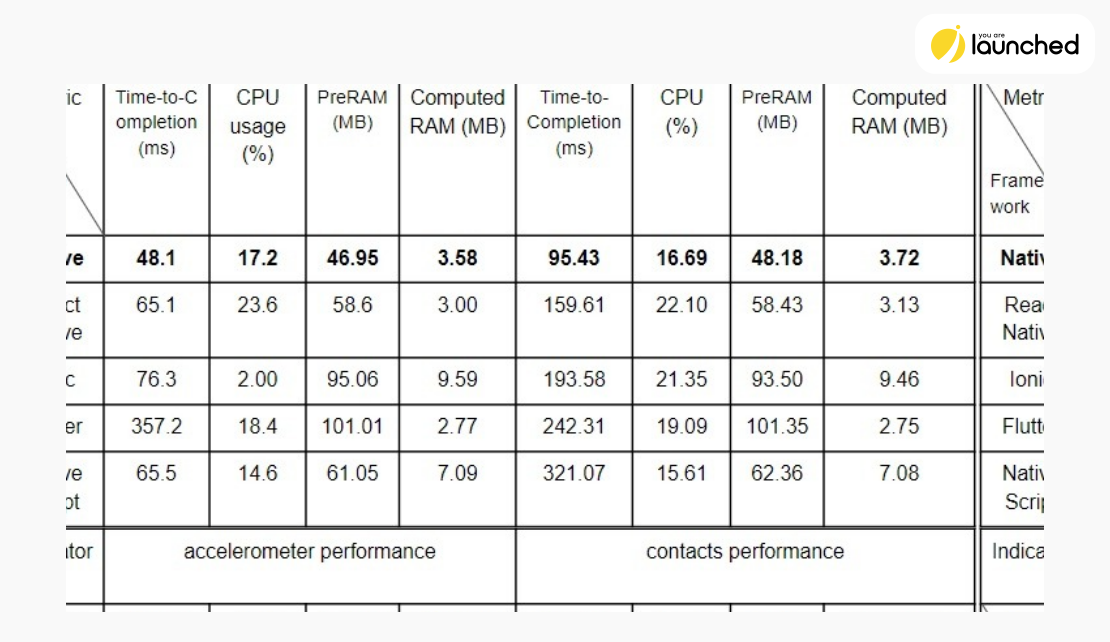
According to the data above, some differences are negligible. React Native and Ionic provide the closest performance to the native technology. However, these are only accelerometer and contact phone features. Flutter is a bit tricky as it transfers a lot of load on PreRAM. Its computed RAM is sometimes even lower than the baseline. However, its PreRAM is often at least twice as high.
If you go for a very performant app and wish to include complex features, then a cross-platform app might be not the most optimal solution. For simple to even mid-complexity apps, this is often not so significant. After all, cross-platform development is really stepping up its game.
Ecosystem Considerations
In web development, Google search is the major arena where web apps want to be ranked. So developers do their best to show up the highest. Developers streamline their efforts towards the requirements of mostly Chrome browsers. The same considerations apply to mobile apps. As a business owner, you can view Apple App Store and Android Google App as different markets with their own rules, tendencies, and participants.
The visibility of mobile apps is the area of the most concern for marketers and business owners. How do you work with search algorithms and app store promotional mechanisms to continuously sustain top performance? In the Apple store, for iOS 11 and above, if you solve major app issues and update your app – you can reset the reviews. Also, the frequency of updates bumps up your visibility on the iOS app store. Apple appreciates apps that are regularly maintained.
Android offers a slightly different game plan. In terms of reviews, users can prioritize the most recent or most helpful reviews. In terms of updates, Google Play evaluates them as your commitment to users. However, updates on Google Play are a bit trickier. Since Google Play serves a variety of devices (versions and manufacturers), an update may decrease the number of supported devices. As a result, the app’s ranking will tank down. This does not happen with the iOS app.
Conclusion
To make the right choice for your next app, take into account the following points:
- Considering the market: Apple’s app store is more sophisticated. So it will require deeper knowledge of Apple’s marketing tools to build your marketing strategy and promotion. Android’s Google Play is a little more scattered in terms of gathering data, but it has more users in certain demographics. Cross-platform development targets both markets, so it is best to have trained people on board as app launch promotion is time-sensitive. Your team needs to react quickly and professionally.
- In native vs cross-platform app development, cross-platform development is more affordable. It is if you compare it with developing two apps: one for the iOS app store, and one for Google Play. If you consider it as a single process, then Android is the most affordable option. Both: in terms of cost and time. iOS will be similar to cross-platform if you think about development costs. However, in terms of time, iOS development will be faster than cross-platform.
- Functionality is often better for native apps considering native vs cross-platform app development. This includes app performance and the ability to implement more complex features. In addition, native apps will be rendered more consistently and with fewer mistakes than cross-platform apps. However, it is likely not to be an issue for some apps that are not high in complexity and consist of fewer screens. In addition, cross-platform development is on the rise and it is bridging the gap in performance with native apps.
- Treat a choice of development as a choice of your arena. Each app marketplace will have its own rules and strategies. To maintain top performance, it is essential to understand, implement and easily navigate them.
FAQ: Native Mobile App Development vs Cross-Platform App Development
Native mobile app development involves creating applications specifically for a particular operating system, using the native programming languages and tools of that platform. For iOS, this means using Swift or Objective-C, and for Android, Kotlin or Java.
Cross-platform app development allows developers to create applications that can run on multiple operating systems, such as iOS and Android, using a single codebase. Popular frameworks for cross-platform development include React Native, Flutter, and Xamarin/MAUI.
Native app development offers superior performance, better user experience, and full access to the device’s hardware features. Apps are more reliable and can leverage the latest platform features immediately.
Cross-platform app development is cost-effective and time-efficient because it allows for a single codebase to be used across multiple platforms. This reduces development time and cost compared to building separate native apps for each platform.
Cross-platform development is generally more cost-effective when targeting multiple platforms, as it involves one codebase and one development team. At the same time cross-platform takes more effort to maintain and scale the app. However, if targeting a single platform, native development (particularly Android) may be cheaper.
Native apps typically offer better performance and more efficient use of device resources. Cross-platform apps may experience slower performance and more bugs, especially when accessing complex hardware features or rendering intricate UI elements.
While cross-platform frameworks have made significant strides, accessing some native device features like NFC, Bluetooth, and AR capabilities might require third-party plugins, which can impact performance and introduce additional complexity.
Native apps provide a more polished and consistent user experience, as they adhere to platform-specific design guidelines. Cross-platform apps might face challenges in rendering UI elements consistently across different devices and operating systems.
Native apps are tailored to the specific requirements and guidelines of their respective app stores, potentially offering a smoother review and approval process. Cross-platform apps must ensure compatibility and compliance with multiple app stores, which can be more complex.
For an MVP, cross-platform development can be a better choice due to its cost and time efficiency. It allows you to quickly validate your app idea on multiple platforms with minimal investment.
Cross-platform apps benefit from a unified codebase, simplifying updates and maintenance but requiring developers to stay abreast of updates to all supported platforms that leads to more complications when we are talking about scaling. Native apps require separate maintenance for each platform, but in terms of scaling the architecture is more robust, so it takes less efforts in the long run.

